


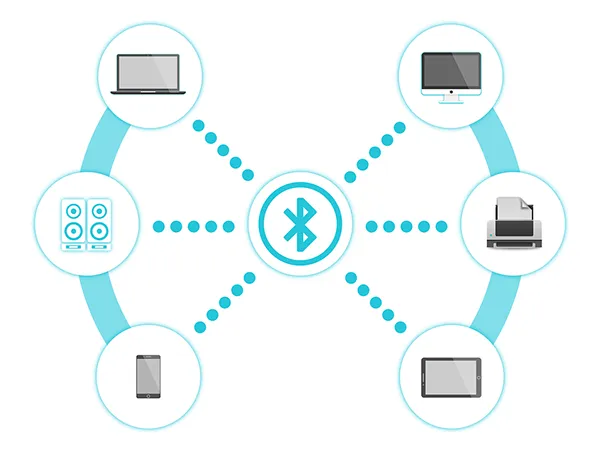
Bluetooth technology is not something new. It began to be developed as early as 1989, by the company Ericsson Mobile so that data could be transferred between devices without the use of cables.
The technology got its name 1997 from Jim Kardach of Intel, who at that time was reading a book about the Scandinavian king Harald Bluetooth. Harald Bluetooth was the one who united the regions of Denmark, as well as part of Norway, and given that Bluetooth connects various devices together we can say the name is completely fitting.

Bluetooth technology connects various devices together, without the use of cables being necessary
What exactly is the Bluetooth technology and how does it work?
Bluetooth technology allows communication between devices located at a distance of up to 10m approximately, using radio waves. This communication takes place between a main device (master) and up to seven other devices (slaves).
In terms of hardware the technology works by using antennas that send and receive signals at the appropriate frequencies. That is, every device that supports this technology also has such an antenna so that it can communicate with other devices.
At the protocol level Bluetooth technology is somewhat more complex.
Bluetooth connection is based on the transmission of low-power radio waves. Communication between devices takes place at the frequency of 2.45GHz (more specifically in a frequency range from 2.402GHz up to 2.480GHz). This range has been agreed worldwide to remain "unlicensed" and can be used by all devices with Bluetooth without any problem anywhere in the world they happen to be.
Bluetooth connection is based on the transmission of low-power radio waves
When Bluetooth is enabled a small wireless network is created within a radius of about 10 meters. This short-range network (piconet) has lower power than other wireless networks, such as WiFi, and is less likely to receive interference from other wireless devices.
Specifically Bluetooth uses 79 different channels to connect two devices. Each time communication is established between two devices they randomly pick one of these channels and both use it. The channel in use does not stay fixed, but frequencies are constantly hopped, so that many devices can use the technology in the same space. The frequency change can happen thousands of times per second. In this way Bluetooth can be used in places where many devices operate at the same time.
The constant frequency hopping meant that a lot of energy was consumed to operate Bluetooth, and so the battery of devices that used it ran down very quickly.
This problem was solved by the protocol Bluetooth 4.0 (or Bluetooth Smart) which was officially adopted in 2010 and is characterized by low energy consumption, low cost and extended range. So you no longer need to worry that if you keep Bluetooth constantly active on your device, the battery will run out, but with version 4.0 you can have it always enabled on the devices you need connected.

The Bluetooth 4.0 protocol is characterized by low energy consumption, low cost and extended range
Where is Bluetooth used?
Connectivity via Bluetooth can be particularly useful in our daily lives.
We can connect many and various peripheral devices to the phone, computer or tablet to make our lives easier. Headphones for calls or music, speakers, keyboard and mouse, printer, smartwatches, connecting the phone to the car and many more.
Another very important function of Bluetooth is the ability to transfer files between devices. You can pass a document from your office computer to your phone, you can easily and quickly make a backup of the phone's files on a computer and of course you can share a nice photo you took with a friend.

Besides connecting various peripheral devices to your computer or mobile device, Bluetooth technology is also very useful for transferring files between devices
Is Bluetooth safe?
Bluetooth technology already has security mechanisms to prevent unwanted access to devices by third parties. Like any wireless technology, however, it is not absolutely secure. Some of the main risks a device faces when Bluetooth is enabled and discoverable are the following:
- Malware. Malware can be transmitted via Bluetooth, usually in the form of an app.
- Bluesnarfing. This refers to cases where a third party connects to the device via Bluetooth and gains access to its files (contacts, photos, etc.).
- Bluebugging. In this case a third party may take control of the device and make calls, listen to calls being made, read messages, etc.

Bluetooth technology has security mechanisms but, like any wireless technology, it is not absolutely secure
Do not rush to panic, however, since it is relatively easy to protect yourself from these risks. What you need to do is turn off Bluetooth when you are not using it. That way nobody will be able to "see" your device and attack it. Also, even when you use Bluetooth set your device to be undiscoverable. After you connect the devices you want (e.g. the phone with your headphones) go to the Bluetooth settings and set your device not to be detected by third parties. Do not worry, this will not affect communication between the devices you have connected.
So do not hesitate to use Bluetooth technology in your everyday life. It will certainly make your life easier and – most importantly – save you from unnecessary cables!


