

phishing or electronic fishing is a type of cybercrime where someone tries to obtain sensitive data, such as personal information, bank account or credit card details or even passwords, in order to gain access to other people's personal accounts.
How does Phishing work
phishing is usually carried out through e-mail, but also through various messaging services. The user receives a message asking them to click a link and provide some information about themselves or their account. It is natural that most people would refuse to give personal information to just anyone, but many may be fooled because these messages are so well disguised that they seem to come from legitimate sources.
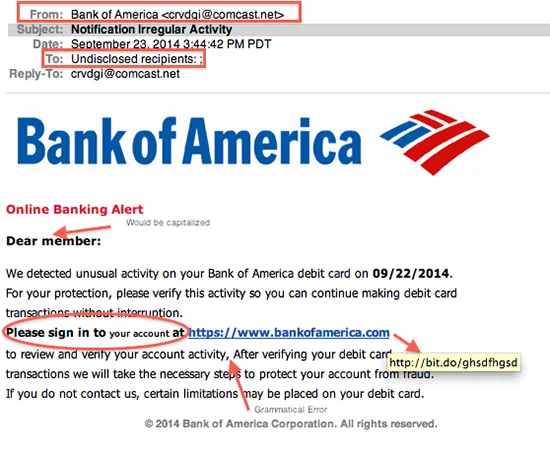
Usually a phishing e-mail will appear to come from a trustworthy sender, e.g. a bank, PayPal, a government organization, etc. The message will include a link or a button urging you to click. It will most likely be urgent in tone, saying that you must act immediately or your account will be closed or you will lose certain privileges. Alternatively it may be presented as a reply to a question you supposedly submitted, or it will have an attached file that urges you to open it. At other times the message will inform you that you have won something and that you must visit a page to claim your prize.
In all of the above cases the link or button you are asked to click will lead to a page where you will be asked to enter personal data and passwords. These pages will look legitimate to the ordinary user, since their creators take care to use logos that look authentic and addresses that come as close as possible to the real ones (e.g. www.bankofarnerica.com instead of www.bankofamerica.com).
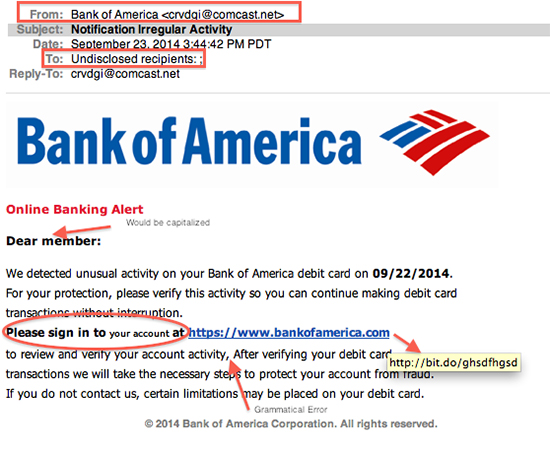
In phishing e-mails you are usually asked to click an external link, where you will be asked to provide some personal details (e.g. username, password)
What risks do I face from Phishing
The main motive of those who carry out this kind of scam is financial gain, and for this reason they usually target bank accounts or PayPal. By creating a page that resembles the genuine one, they ask you to give the codes of your accounts or cards, which they will then use to rob you or make purchases.
Another purpose of Phishing is the collection of personal information, such as contact or identity details, in order to commit other scams using someone else's details (identity theft).
phishing messages may be accompanied by an attached file infected with a virus that will give third parties access to your computer. Although this usually happens to large companies that become targets of scammers, it can also happen to ordinary users.
phishing messages may be accompanied by an attached file infected with malware
Another motive for phishing messages is to encourage people to sign up for a service, so that they are constantly sent a multitude of messages spam and advertisements.
How do I tell that a message is Phishing
Most phishing messages have a few common characteristics. The most frequent is that they are badly written and full of spelling mistakes. It is completely unlikely for a company such as PayPal to send a e-mail with grammar and syntax errors.
Also, these messages will not mention your name. They will say something generic like "Dear customer" or something similar.
It is good to be careful with messages that ask you to do something immediately, otherwise you will face some consequences. When there is a problem with one of your accounts (Google account, Apple ID, PayPal) companies give a time frame to solve the problem and do not demand immediate action.
The same applies to contests, where you should also remember that if the prize is excessively expensive, then the contest is most likely fake.
Always pay attention to the details of a message, such as who is sending it and what it contains. If something looks strange (the sender, an attached file) ignore it. In general avoid opening attachments whose origin you do not know.
Always pay attention to the details of a message (spelling, sender, etc.) and never open attachments when you are not sure of their origin
How can I protect myself from Phishing
There is no way to avoid phishing messages entirely, since their creators exploit weaknesses in the software and security programs on computers, as well as the servers, in order to convince people that they come from reliable sources.
You can, however, follow some tips to protect yourself from such attacks:
- Stay as informed as possible about such scams by following relevant news.
- Protect your computer. If you have an active antivirus and firewall, you greatly reduce the chances of falling victim to such a scam.

Always keep antivirus and firewall enabled on your computer
- Install the latest updates for your operating system and browsers. The upgrades that are released from time to time may include fixes for various security holes.
- Never give personal information (security codes, etc.). No legitimate company will ask you to reveal your passwords.
- Check your online accounts regularly. In this way you can be sure that no one has interfered with them.
- Be careful where you click! The most important precaution you can take is to pay attention to which messages you open and which links you click on. Pay particular attention to the details of every message and simply ignore whatever seems suspicious.