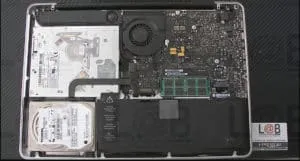


Mechanical disks (HDD) are now considered old and tend to be replaced entirely by the new-technology SSD disks.
SSD disks have no mechanical parts, so they have great resistance to vibration, low energy consumption and very high data transfer speed. Their architecture is completely different from that of HDD disks, but their external appearance, their size, and the way they connect to a computer's motherboard are very similar.
Despite their differences, mechanical disks and SSD disks are very similar in external appearance, size and the way they connect to the computer's motherboard
The needs of the times, however, require the storage media used in our devices to be ever faster and ever smaller.
Fortunately the technology in this field is constantly developing and manages to cover users' needs. So M.2 disks have made their appearance in recent years.
What are M.2 disks?
Essentially M.2 disks are SSD hard disks with a much smaller and thinner shape than the usual ones. The designation M.2 refers, after all, to their shape, which is not so reminiscent of the classic hard disk we all know, but more of a RAM memory module.

M.2 disks do not resemble a classic hard disk, but their shape is similar to that of RAM memory
Their shape is rectangular, they are 22 millimeters wide and their length can reach from 30 up to 110 millimeters. The size of the disk is indicated by a four- or five-digit number, the first two digits of which concern the width and the rest the length of the medium (e.g. a disk marked 2260 means it is 22 millimeters wide and 60 millimeters long). Of course the longer the disk, the more NAND chips can be integrated onto it and so the greater the capacity of the storage medium will be. For example a disk with a length of 80-110 millimeters can have up to 8 chips and a capacity of up to 1TB.
In addition some disks may carry memory chips on both their sides, thus increasing the capacity up to double. This, of course, has the disadvantage that the thickness of the disk also almost doubles, so it may not be the right choice for some very thin devices.
Inside the device these disks connect directly onto the corresponding slot on the motherboard (M.2 slot) on one side and on the other side are secured with a screw so that they do not move.

These disks connect to the M.2 slot of the motherboard and on the other side are secured with a screw
Advantages of disks of type M.2
The main advantage of these disks is of course their very small size, which makes them suitable for use in very thin laptops or even tablets.
Of course, despite their small size they fall short in no way in capacity. Depending on the chips built into each disk their capacity is equivalent to that of the other storage media widely used today.

The main advantage of M.2 disks is their small size, while their capacity is equivalent to that of ordinary disks
Another very important characteristic of these disks is the higher data transfer speed that distinguishes them. These disks connect onto the motherboard using the M.2 interface protocol, without the use of cables. What allows them to reach much higher transfer speeds is the type of connection used, that is the PCI-Express or simply PCIe connection. Unlike SATA, the established data bus standard widely used in personal computers to transfer data from hard disks to the central processing unit, PCIe is extremely faster. Indicatively we mention that while the data transfer speed via a SATA connection reaches 600MB/sec, via PCIe speeds of up to 4GB/sec are achieved.

Because of their interface protocol with the motherboard, M.2 disks achieve higher data transfer speeds
Another advantage of M.2 disks is the fact that they have some features that make them consume less energy. Especially nowadays when most devices are never turned off but simply go into sleep mode to be ready for immediate use, these features help the device's battery last much longer.
Can I also upgrade my computer with such a disk?
Before you decide to replace your computer's storage medium with an M.2 disk you must take some prerequisites into account.
First of all you must be sure that your motherboard has an M.2 slot where the disk will connect. Older motherboards are very unlikely to have this interface protocol, so decide to do the upgrade only if your motherboard is a good-quality motherboard from the last 2 – 3 years. But even if your motherboard has the right slot you must also know what disk size can fit in it.

Before you decide to replace the disk you have with an M.2, make sure your motherboard has a corresponding slot
Whether you do the upgrade now or not, it seems that in the future the use of mechanical disks will decline further, while smaller disks, such as M.2, will be the main storage medium in our devices.