

All of us have at some point faced a problem with the computer or one of its peripherals (e.g. a printer) and when we turned to a technician were told that the problem is that the device's drivers are missing or not up to date.
What are drivers and why must they be up to date?
Device drivers, or device drivers or simply drivers, are programs that accompany a computer device, e.g. a printer, a storage medium, a graphics card, etc.
These drivers are created by the manufacturers of each device themselves and must be installed on a computer in order for the device to be used.
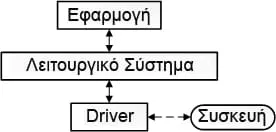
Essentially they are programs that explain to the Operating System how to use the device. That is, they contain the information about how to communicate with the device and its capabilities.

Where can I find drivers for my devices?
Το λειτουργικό σύστημα του υπολογιστή διαθέτει κάποιους γενικούς drivers, με βάση τους οποίους μπορούν να λειτουργήσουν οι περισσότερες απλές περιφερειακές συσκευές. Μπορεί όμως οι drivers αυτοί να μην αρκούν για να μπορέσουμε να εκμεταλλευτούμε όλα τα χαρακτηριστικά μίας συσκευής. Για αυτό είναι καλύτερο να εγκαταστήσουμε τους drivers που διατίθενται από τον ίδιο τον κατασκευαστή της συσκευής.
Many simple peripherals can work with the generic drivers that are installed on Windows. For some other devices it is better to install those drivers provided by their manufacturer.
In most cases when we buy a device there is also in the package a CD with its drivers. If our computer has no drive for playing CD or CD is not included in the package, we can download the drivers directly from the manufacturer's website and install them on our computer. This is perhaps the best option, because we can be sure that we will then have the latest drivers available.
Which devices need drivers?
To use most peripherals it is almost certain that we must install the drivers that accompany them. Devices that need drivers installation usually include printers, multifunction devices, web-cameras, fax, graphics cards, special devices (remote controls, controllers), cameras, motherboards (motherboards), sound cards, game controllers, projectors.

Printers, multifunction devices, web cameras and many other computer peripherals require drivers installation in order to work properly.
Of course there are also devices that we can use as soon as we connect them to our computer, without any additional action on our part. These devices may not need drivers to work, or are simply covered by the generic drivers that the operating system has. Such devices are usually simple mice and keyboards, processors, ram memory, hard disks, cd-rom and dvd-rom, monitors, power supplies, speakers, flash drives.
How can I be sure I have the right drivers for all my devices?
As we said, the right drivers are necessary for the proper operation of a computer's peripherals. This does not mean, however, that they should become an obsession for us.
Although it is always wise to keep our computer's software up to date, it is not always necessary to have the latest drivers released. In general, if our devices work properly there is no need to worry about drivers.
Of course, when we notice that a device is not working properly (e.g. the printer does not print as it should) or we cannot use all its features, then we must definitely update the drivers for that device.
In general, drivers should not concern you if your computer and its devices work normally. If, however, you notice that a device is not working properly or at all, it is a good idea, either on your own or with the help of a technician, to check, besides the device itself, the drivers that are necessary for its operation.